Hide Price for Magento 2

Transparent pricing We believe in being open and honest with our customers. When you buy our module, you get one of free support and updates.

Here's what you get: Free updates for 1 : You'll receive the latest versions of the module at no extra cost.
Free support: Our team will help you with any questions or issues after your purchase.
Cancel & renew options: You can cancel your subscription at any time and renew it later, but keep in mind that an additional fee will apply if you choose to renew.
Add to Wish List

Updates and support prolongation -

Hide product prices and "Add to cart" button for specific products or whole categories. Manage prices display depending on customer groups. Customize button texts and messages to make your pricing policy maximally flexible.

  • Hide prices for entire categories or specific products
  • Disable adding to cart, wishlist and comparison
  • Replace 'Add to Cart' with a custom button
  • Display prices to particular customer groups
  • Redirect customers to any store page
  • Hyva-ready storefront
  • Compliance with Hyvä Theme & Hyvä Checkout CSP
  • WCAG compliance (for Hyvä Theme)
Loading

What is Magento 2 Hide Price?

Magento 2 Hide Product Price is designed to create a well thought out pricing policy and ensure high conversions. If you are looking for a tool to easily manage price display on product and category pages, the extension is exactly what you need. The module lets you hide prices for guests or any other customer groups. Apart from that, you can remove or replace the 'Add to cart' option with a custom button to encourage customers to specify their contact info or perform the action you need. This approach enables you to personalize the shopping experience and adjust prices to your business needs.

Flexibly manage product price display

Show Magento products without prices

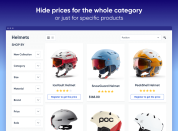
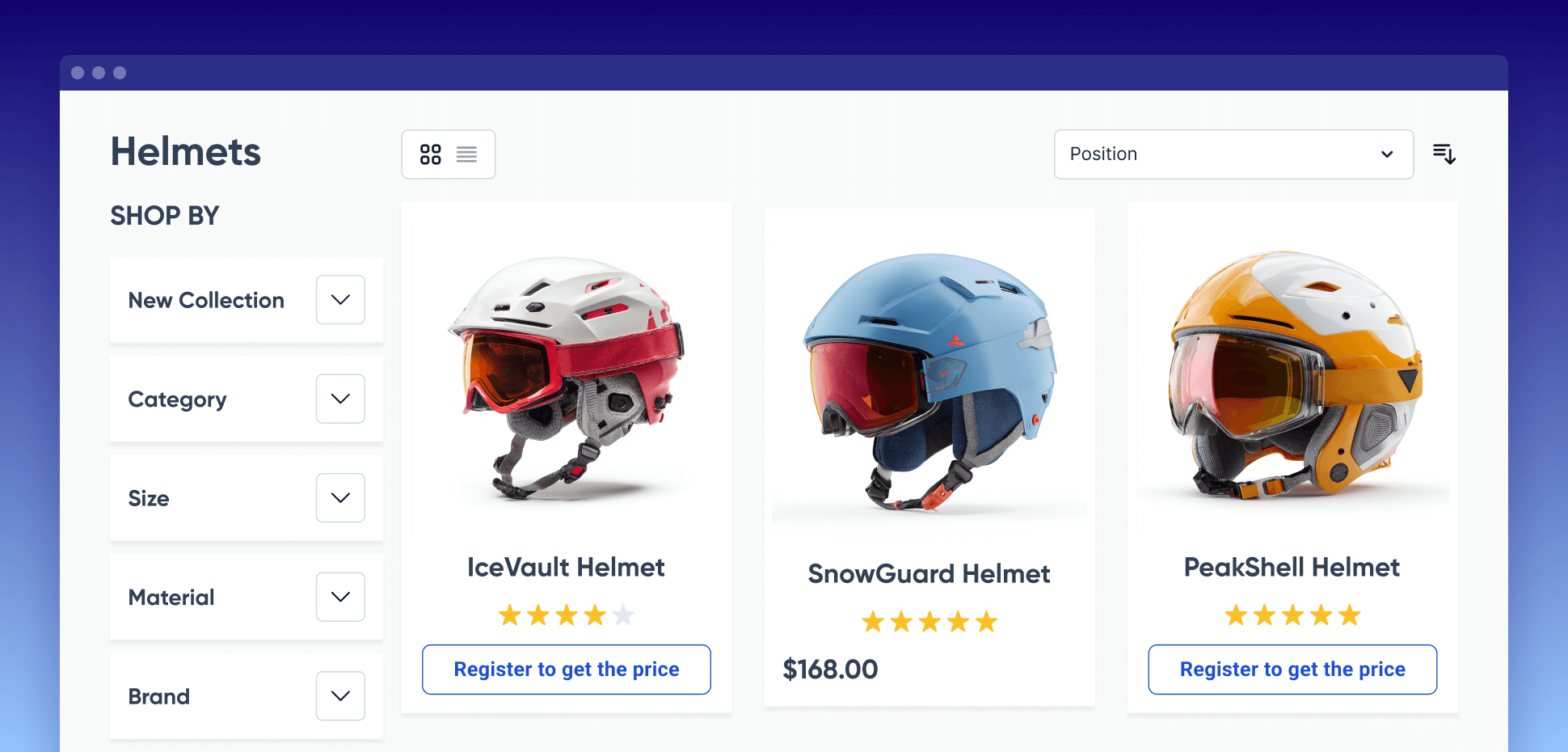
With the Magento 2 Hide Price extension, you can hide prices on specific product pages or entire categories. Thanks to flexible settings, you can effectively control price visibility, tailoring it to different customer groups or business strategies to meet your specific needs.

Disable the 'Add to Cart' option

Remove the 'Add to Cart' button for any store item and disable the Magento 'Add to Compare' button. Use customizable options to encourage your store visitors to take specific actions to view the price (e.g., register, contact store admins directly, etc.).

descr-1-190226

Customize the 'Add to Cart' button

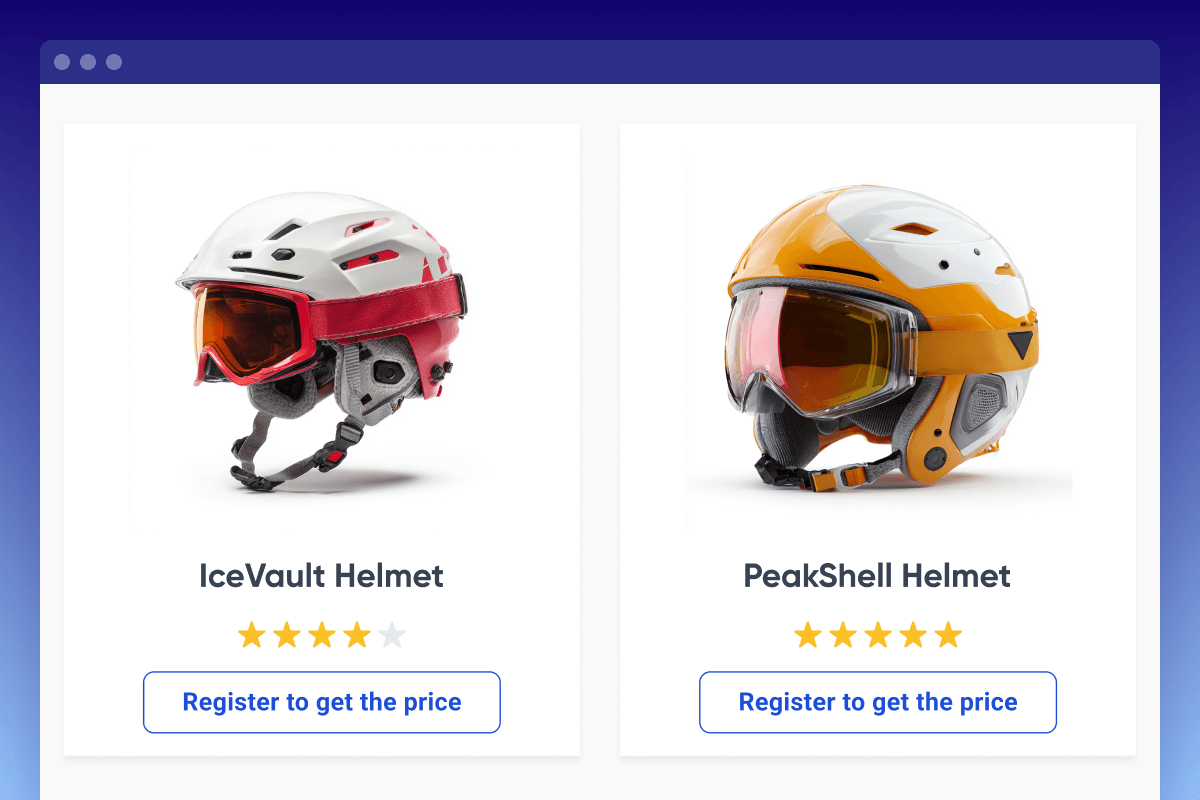
With the Hide Price Magento 2 extension, you can not only remove the 'Add to Cart' button but also replace it with a custom one. Customize the button text to encourage customers to share their contact information and provide additional order details, such as product material, size, and more.

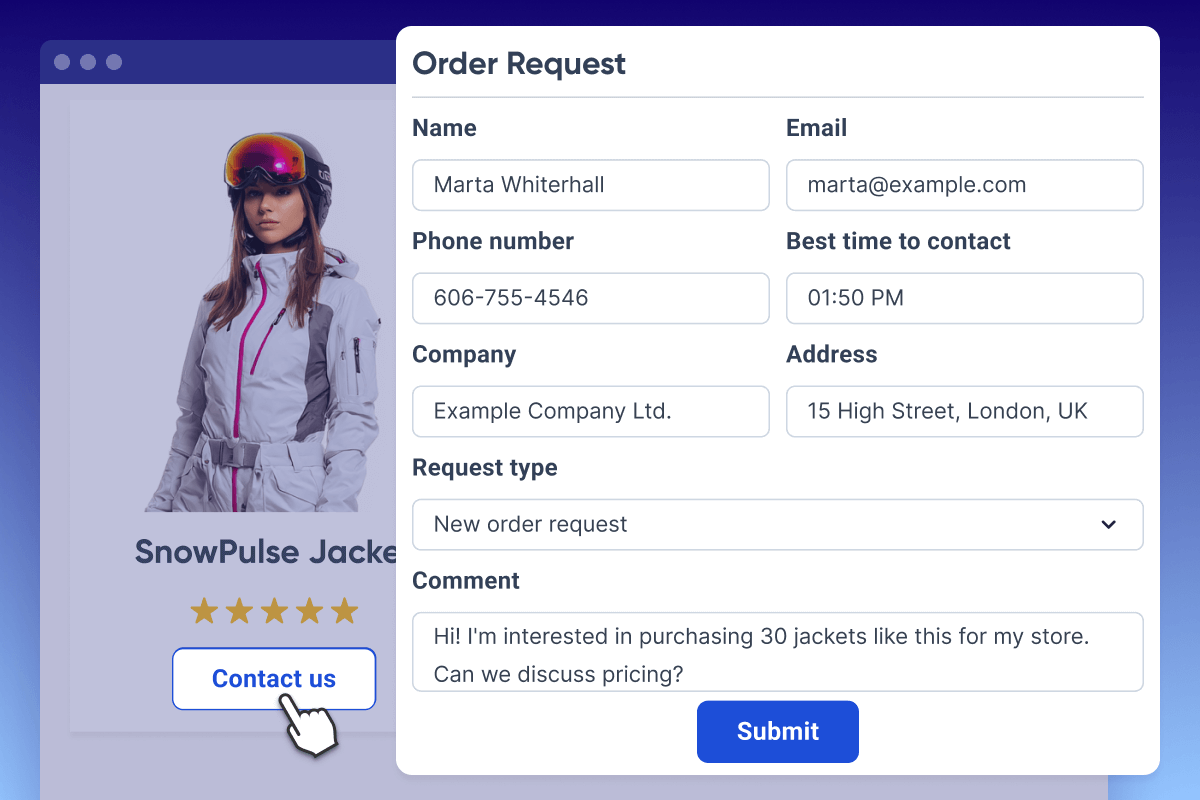
Collect customer data with a pop-up

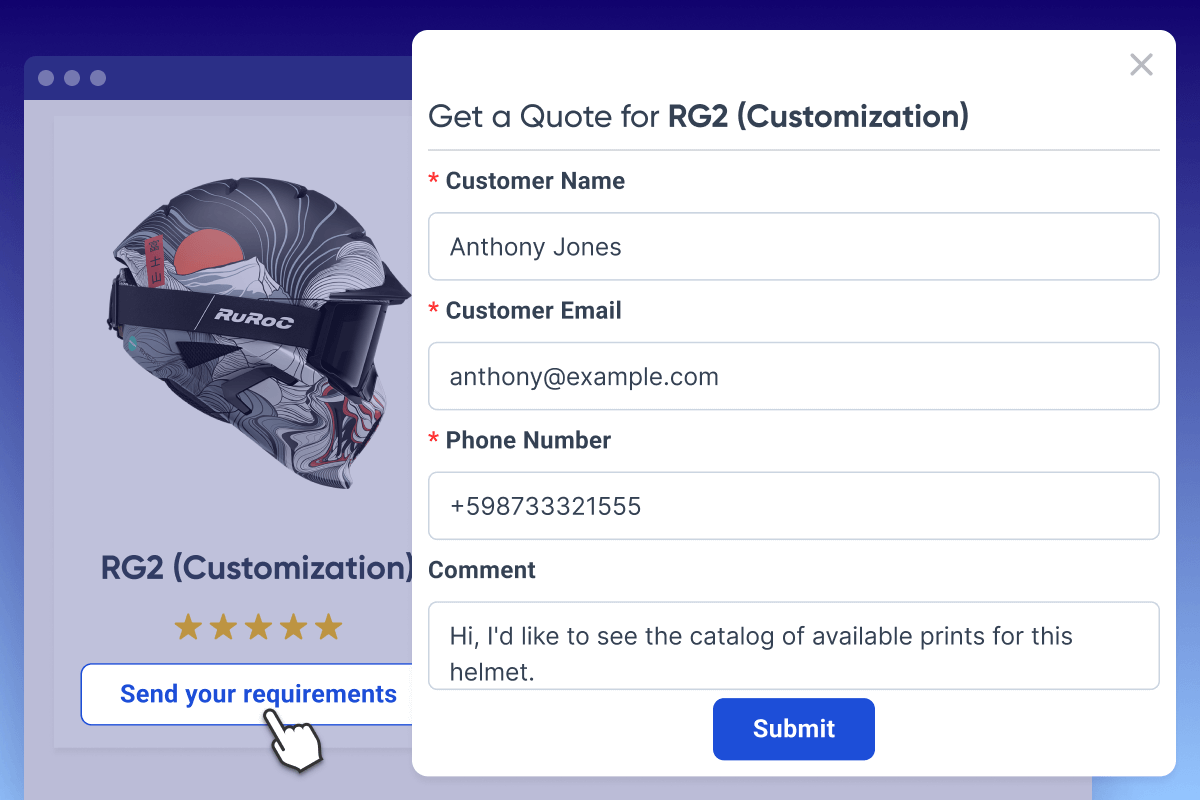
A convenient pop-up window appears when a visitor clicks the custom button that replaces the 'Add to Cart' button. This feature is designed to help store admins quickly collect customer data, making it easy to tailor prices based on specific requirements, contact customers directly, and build a rich client database for your marketing efforts.

descr-2-190226
descr-3-190226

Redirect users to specific store pages

Link custom buttons to any page according to your marketing and sales strategy. For example, replace the 'Add to Cart' button with 'Register to See the Price' and redirect shoppers to the registration page, or guide them to a 'Learn More' page for additional details on the product's tariff plans.

Restrict price visibility based on customer groups

Use magento hide price module to show or hide product prices depending on customer groups, ensuring each user sees only relevant content. This allows you to easily create special offers for wholesalers or retailers while keeping pricing information hidden from others.

Notify admins about new quote requests

This feature ensures that admins are automatically notified via email whenever a new quote request is submitted. By receiving timely notifications, you'll be able to respond quickly, reducing average response times and enhancing customer satisfaction.

View request details and send email replies

To efficiently handle 'Get a Quote' requests, you can view the details of each request on a dedicated page and respond directly via email without leaving the page. This feature allows you to provide quick and personalized replies to your customers.

Create custom quote request forms of any types

Add Custom Form extension to easily collect additional customer information and tailor quote requests to your needs.

This functionality allows you to create quote request forms with various fields, such as zip code, company name, address, preferred contact time, request type, file uploads, and more. You can also use field dependencies for the 'Call for price' pop-up and customize forms to suit your business.

By enriching your client database with detailed information, you’ll be able to craft personalized offers and better meet your customers' needs.

descr-4-190226
descr-5-190226

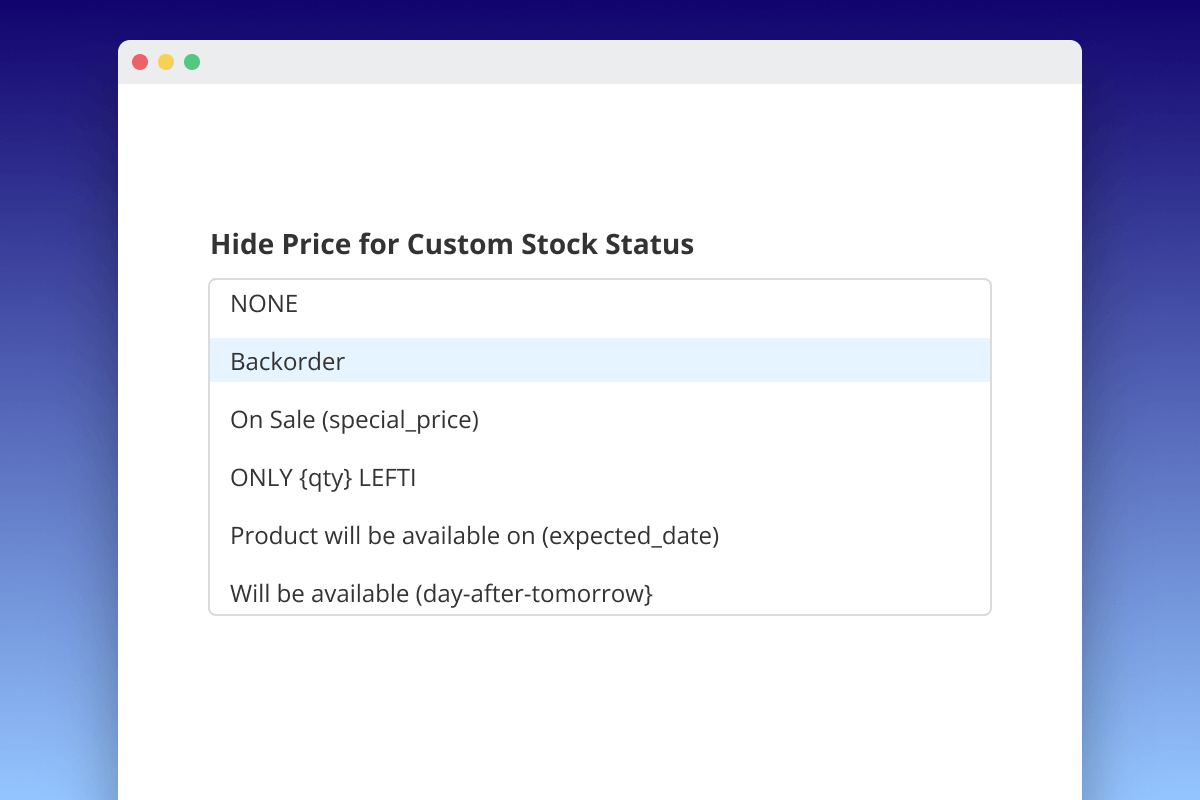
Hide price for products of a particular stock status

Add Custom Stock Status extension to hide price for products of a particular stock status. If you have both modules installed, you can hide prices for products with specified stock statuses in one click.

  • With Magento 2 Custom Stock Status, assign stock statuses to products.
  • With the Amasty's Hide Price extension, choose the stock statuses you want to hide prices for.

As a result, the price will be hidden for all products of a defined stock status automatically.


More features of Magento 2 Hide Price extension

  • Customize Hide Price button text and style
  • Hide prices and buttons for specific products
  • Disable comparison and adding products to wishlists
  • Enable automatic respond for store visitors
  • Monitor all customers’ requests on a handy grid
  • Support for multiple store views 
request-a-quote-for-magento-2

Offer individualized pricing to your customers.

Let customers negotiate prices with the Magento 2 Request a Quote extension. Understand what your audience wants and get clearer insight into industry demand. Create highly personalized offers your customers can’t resist.

FAQ

Some merchants hide product prices for guest users in Magento 2. It may come in handy if you offer complex or customizable products and services, and the price depends on a specific case. Another common reason to hide prices is high competition, so you want to prevent price dumping.

magento 2 hide price for guest
  • Install and enable the Hide Price module.
  • Navigate to Stores > Configuration > Hide Price.
  • In the Hide Price for Selected Group(s), choose the NOT LOGGED IN option.
  • Then, open the Hide Price Options section and set the Hide Price field to Yes.
  • Configure remaining settings according to your business needs.
  • Save the changes.
  • Install and enable the Hide Price extension.
  • Navigate to Stores > Configuration > Hide Price.
  • In the Hide Price Options section, set the Hide Add to Cart field to Yes.
  • Complete other settings if needed.
  • Save the changes.

Disabling Magento Compare can be done easily through your store settings or by editing layout files.

  • Via Admin Panel: go to Stores → Configuration → Catalog → Catalog → Product Listings and set Allow Product Comparison to No. Then clear your cache.
  • Remove compare links manually: if links still appear, remove or comment out the compare blocks in layout files like catalog.xml or your theme’s default.xml.

After applying these changes, refresh the cache and reindex.

This feature increases user commitment to the store and prevents your direct competitors from seeing the prices of your products. You can hide prices in Magento 2 if a user is not logged in using this extension. Moreover, you are provided with a number of different options to manage prices showing on your store pages and settings for displaying the "add to cart" button.

  • Install the extension.
  • Navigate to Stores > Configuration > Hide Price > General Settings tab.
  • Choose Yes in the first line to Enable Extension.
  • Specify the Hide Price for Selected Category(s) option and Hide Price for Selected Group(s) option by choosing necessary variants.
  • Exclude specific customers and products if you want to hide prices for whole product categories or/and customer groups.

Magento 2 Hide Price extension with free consultation allows you to avoid dumping by competitors and currency fluctuations. Magento Hide Price for guest extension with free consultation gives you the opportunity to demonstrate the quality and peculiarities of the goods and your loyalty to the customer, receiving immediate feedback and the ability to respond quickly to the wishes and opinions of customers.

The default functionality doesn’t provide the Magento disable compare products function. Hide Price extension allows you to disable comparison and adding products to wishlists or to hide prices. This way you can adjust the store to your business needs and avoid price dumping.
To adjust these functionality, please navigate to Stores -> Configuration -> Hide Price -> Hide Price Options Mode

Adobe partner logo
Magento Marketplace logo
4.1 Trustpilot logo
See 500+ verified reviews
1 Single points of sales
Trusted by Customers
Amasty extensions work with all plugins we issued and with most 3rd-party plugins. If you come across a Magento 2 compatibility issue with any third-party module, we’ll definitely try to help you. If you face any technical issues, please create a ticket...
Product updates for extensions purchased before Feb 1, 2022With the transition to product subscriptions, you will receive product updates for all extensions purchased before Feb 1, 2022 throughout the entire grace period — up to Aug 1, 2022. If you ...
Yes, you can use installation and configuration services that are available as the part of Pro and Premium add-ons for your product subscriptions.Please note that this installation service doesn’t include uninstallation. So, if you need to completely...
Amasty doesn’t provide any trials of Magento extensions. There's one exception: Amasty extensions are provided for testing or demo purposes to our official Platinum Partners as a part of the “access to Amasty extensions for testing purposes with Composer...
Yes, you can install any Amasty extension on a test site and configure all the settings there before doing it on your live store.
Amasty offers to its Customers a thirty (30) day money-back guarantee for the Software. In case the acquired extension didn’t meet your expectations, our support team is always ready to help you. Fees for support subscriptions and any services provided...
We are now working at a loyalty program for our customers that is supposed to bring even greater benefits in the long term. While it’s not out yet, you can look through these Special Offers. New discounts and specials are added every month. To stay ...
Updating an Amasty extension follows the same process as installing a module. To update a single extension:Run the following command to update a specific Amasty extension:composer update amasty/<module-name> To update multiple extensions:You can...
To leave your feature request, log in to your customer account and open the Products tab. Then, scroll down to the bottom of the page, and leave your feature request in the following form: As soon as you send your request, it is considered by our ...
Amasty extension packages include all necessary files, setup guides, and a license agreement, with some even offering example import files to simplify the process.Important: Since January 14, 2025, all Amasty extensions will only be available for installation...
If you have an active support service subscription, it provides access to product updates and support services for the products assigned to the projects that have an active support subscription.Alternatively, support services are only available as the...
Usually, no, you can’t exchange modules. Please, contact our support managers and they’ll consider your case individually. → Learn more about our special offers
Usually, we don’t provide any discounts. But you can contact us, and we’ll consider your case individually. → Learn more about our special offers

Usually, marketers don’t recommend hiding prices on product pages of an online store because it may trigger mistrust in prospects. But there are situations when it may be useful to hide price in Magento 2 at least from not logged-in users.You can enable Magento 2 Hide Price for not logget in customer group” and set a custom message as “Log in to see price” with a custom URL link to Customer Login Page.

5

8 reviews

  1. Mason
    Oocap
    Verified Buyer

    Customizable pricing control for e-commerce
    The Hide Price for Magento 2 module by Amasty is ideal for our e-commerce store's need for flexible pricing visibility. This tool allows us to hide product prices from specific customer groups, making it perfect for B2B transactions and promotional campaigns. It’s easy to install and configure, integrating seamlessly into our platform. The module helps us manage negotiations and special offers effectively, enhancing customer engagement and optimizing our pricing strategies.

    Amasty answer

    Hi Mason, thank you for your fantastic review! We're delighted to hear that our Hide Price for Magento 2 extension is meeting your needs for flexible pricing visibility. It's great to know it’s easy to install and configure, and that it’s enhancing your B2B transactions and promotional campaigns. Your kind feedback means a lot to us!
  2. Alex
    Orbus

    Great for B2B
    This works amazing for our b2b storefront where login is required.

    Amasty answer

    Hi Alex, thank you for the review! It’s great to hear that the extension is helpful. We'll be happy to see you in our store again!
  3. Jessica
    49er Communications, Relationship Manager

    Keeps us in regulation for selling
    We wanted to not show visible pricing on the website unless customer is logged into their account, and this extension works great. It accomplishes our needs and keeps us in regulation for selling. This is great when you have a very specific customer base/group that can purchase certain items.

    Amasty answer

    Dear Jessica, thanks for your feedback, we're happy to hear that the extension meets your needs and gives your more control over the sales process. Thank you for being our loyal customer, and we'll look forward to seeing you in our store again!
  4. Péricles
    VIVOCI, Director
    Verified Buyer

    It works perfectly
    Essential for B2B commerce. The extension does what it promises.

    Amasty answer

    Hi, Péricles!

    Thank you so much for your kind review.
    We would be happy to see you in our store again!
  5. Gabriel
    IOWEB TECHNOLOGIES, Senior Developer

    Support is the main reason we prefer Amasty's modules
    I've been using Hide Price M2 for about 2 years. The main thing that I wanted to solve was handle b2b presentation of specific products. The result is excellent as always. We haven't heard any complaints from our customers so far. We absolutely like how configurable it is and how many options it provides. You can set rules or set it on product level. It's very flexible. Support is the main reason we prefer Amasty's modules. They work in a very timely manner. I can reccomend this module to anyone with b2b needs that needs precise control over price presentation.

    Amasty answer

    Dear Gabriel!
    Thank you for choosing our extensions. I’m glad that you appreciate their quality.
    We would be happy to see you in our store again!
  6. Andrew Taylor
    Measured Designs, Managing Director

    The Hide Price plugin is robust and dependable.
    The Hide Price plugin by Amasty is the most stable and regularly updated of its type. After using a competitor's plugin for several years i had to manually remove it after it no longer kept pace with Magento's core updates. Support is always prompt.

    Amasty answer

    Dear Andrew, thank you for your review! We would be happy to see you in our store again!
  7. Sara

    good features
    I have installed this extension on my Magento 2.2 and it works exactly as described. It has rather good number of features. Thanks a lot!
  8. Dwane

    What a great work!
    I have reviewed several similar extensions and have found this one is the best! The superior feature list. Known good support and free lifetime updates. Thanks.

Do you need specific features added so you can achieve your business goals?

Drop us a line and we'll customize this extension for you!

Public Roadmap
Explore upcoming updates

You can install extensions and updates via Composer

See Magento (and other software) versions we support and guarantee their compatibility with our extensions


x Version 1.8.3 Last Update: Mar 17, 2026
1.8.3 - Mar 17, 2026
  • Improvement we implemented a dedicated system module for integrating the fancyBox library
1.8.2 - Feb 23, 2026
  • Fix we fixed an issue where product attributes were not auto-filled when the "Add to Cart" button was replaced with a form from the Amasty Custom Form module
1.8.1 - Jan 13, 2026
  • Fix we fixed an issue where the ‘Hide Add to Cart’ setting did not work in the ‘Recently Ordered’ widget
  • Fix we resolved an issue where the ‘Add to Cart’ button was not hidden on the Wishlist page and in the Wishlist sidebar widget
1.8.0 - Jun 23, 2025
  • New we added the ability to set the 'Add to Cart' button visibility at the product level. You can find the ‘amasty/module-hide-price-add-to-cart-button’ package for installing in composer suggest (Note: the feature is available as a part of an active product subscription or support subscription)
  • Improvement we improved module performance on category and product pages
  • Improvement the extension now hides tier price information when the product price is hidden
  • Fix we updated the module’s code for compatibility with Magento 2.4.8, resolving the ‘Zend_Db_Statement_Exception’ error on configurable product pages when the module is enabled
  • Fix we resolved the issue where the ‘Add to Cart’ button was not hidden for products on the Home Page
  • Fix we enhanced compatibility with Request a Quote extension to ensure that if the ‘Add to Cart’ button is hidden but ‘Request a Quote’ one is enabled, the ‘Qty’ field is displayed
  • Fix we enhanced the Amasty Shop by Brand module compatibility, ensuring the ‘Add to Cart’ button is hidden in the ‘More from this Brand’ block
x Version 1.7.2 Last Update: Apr 25, 2025
1.7.2 - Apr 25, 2025
  • Compatibility compatibility with PHP 8.4 was added.
1.7.1 - Jun 18, 2024
  • Improvement we improved compatibility with the 'Recently Viewed' widgets so price hiding functionality works according to the general module configuration
  • Fix the import issue was fixed, and now the products with hidden prices are being imported correctly
  • Fix we fixed compatibility with the Amasty Advanced Search module, so now the prices in the ‘Recently Viewed’ block are hidden as they should be
  • Fix we fixed the problem with exporting products
  • Fix we fixed the error that occurred on the main page when enabling developer mode
  • Fix we fixed the display of the 'Call for Price' button for child products of configurable products
  • Fix we fixed compatibility with Amasty Google Invisible reCaptcha, and now the price request form submits without errors
1.7.0 - Sep 27, 2023
  • Compatibility we added the compatibility with Hyvä Theme for Hide Price. You can find the 'amasty/module-hide-price-hyva' package for installing in composer suggest (Note: the compatibility is available as a part of an active product subscription or support subscription)
  • Refactoring we added caching and refactored the code base to improve the module performance
  • Fix we fixed the compatibility with Amasty Product Option Templates so now options are being displayed with the prices as they should
  • Fix we eliminated the error occurred while data deployment
  • Fix we fixed the issue with AlpineJS event listener
x Version 1.6.2 Last Update: May 02, 2023
1.6.2 - May 02, 2023
  • Fix we fixed the price missing issue on the product page when the "hide price" setting is disabled
  • Fix we eliminated the error occurred when scheduling new update for category on Magento EE
  • Fix now category pages open without problems when "Hide Price Text" setting is empty
  • Fix we solved the problem with products hidden price displaying in the code of the product page
  • Fix we fixed the error occurred while setup:di:compile command running
1.6.1 - Mar 13, 2023
  • Compatibility now the extension is compatible with Magento 2.4.5-p2, 2.4.6
1.6.0 - Jun 23, 2022
  • Improvement now you can save any number of Customer Groups when using Hide Price - Use Current Price Mode By Customer Group setting
  • Improvement we switched the module to a declarative schema
  • Fix the issue with price hiding for Grouped Products was resolved
  • Fix we fixed the compatibility with Amasty Advanced Search so now for registered users products in popup are displayed with prices and call for price popup works as expected
  • Fix the problem with updating the prices of configurable child products was resolved
x Version 1.5.23 Last Update: Apr 04, 2022
1.5.23 - Apr 04, 2022
  • Compatibility we improved compatibility with Magento 2.4.4
1.5.22 - Dec 28, 2021
  • Improvement we adjusted the way the category tree is displayed in the configuration
  • Fix now products with customizable options and hidden price are added to the cart as expected
1.5.21 - Aug 18, 2021
  • Compatibility we improved the compatibility with Amasty Advanced Search extension
  • Fix we corrected the display of configurable options in dropdown in case it’s the only dropdown on PDP
1.5.20 - Jan 13, 2021
  • Improvement we adjusted the extension functioning regarding Configurable Products
  • Fix we resolved the issue with hiding of tier prices for Bundle Product options
1.5.19 - Sep 30, 2020
  • Fix we synchronized the displayed time of Get a Quote Requests creation on the grid and on the view page
  • Fix we resolved the issue occurred upon item moving to Wishlist from Shopping Cart
1.5.18 - Aug 10, 2020
  • Compatibility ?ompatibility with Magento 2.4 was added
1.5.17 - Jul 14, 2020
  • Compatibility compatibility with Amasty Quick Order and Amasty Elastic Search was improved
  • Improvement now hiding of Add to Cart button is not only visual, but also restricts adding to cart from Wishlist page, Amasty Quick Order page, etc.
1.5.16 - Apr 24, 2020
  • Improvement now the extension use Laminas library instead of deprecated Zend to hide product prices
1.5.15 - Mar 17, 2020
  • Improvement we rechecked and established correct dependency on jQuery UI library
1.5.14 - Jan 31, 2020
  • Improvement we slightly improved email notification templates
1.5.13 - Nov 28, 2019
  • Improvement we enhanced the security level of the plugin regarding prevention of XSS injections
  • Fix we resolved the issue with hardcoded words in email templates - now they are available for translation
1.5.12 - Oct 01, 2019
  • Compatibility we enhanced compatibility with Request a Quote plugin even more. If the price is configured to be hidden, the customer will not see this price in quote cart as well
1.5.11 - Aug 20, 2019
  • Improvements minor improvements were implemented
1.5.10 - Aug 07, 2019
  • Fix minor issues were resolved
1.5.9 - Jul 11, 2019
  • Compatibility we improved compatibility with Custom Form extension
  • Fix we solved the issue with adding hided products from My Wish List page
1.5.8 - Jul 09, 2019
  • Fix issue with mass delete action was resolved
1.5.7 - Jun 10, 2019
  • Compatibility the compatibility with Amasty Request a Quote extension was improved
  • Fix the issue with Zend_Dom_Query package was resolved
1.5.6 - Apr 19, 2019
  • Improvement now it allows sending admin notifications for several users
1.5.5 - Mar 15, 2019
  • Compatibility compatibility with Amasty Request a Quote extension was added
  • Improvement ability to close 'Call for price' popup by click on the top-right cross button was added
1.5.4 - Jan 10, 2019
  • Fix an issue with Hide Price Text field XSS vulnerability was resolved
1.5.3 - Dec 21, 2018
  • Compatibility the compatibility with Magento 2.3.0 was added
1.5.2 - Dec 05, 2018
  • Fix the issue with configuration section was fixed
1.5.1 - Dec 04, 2018
  • Improvement minor improvements were made
1.5.0 - Dec 03, 2018
  • New ability to create custom 'Quote Request' form of various types to effectively collect customer info, e.g. to add the zip code or any other field, adjust Google Maps element or use fields dependency for the 'Call for price' pop-up was added. Amasty Custom Form extension is required for this feature
x Version 1.4.1 Last Update: Nov 29, 2018
1.4.1 - Nov 29, 2018
  • Fix the issue with module config settings was fixed
1.4.0 - Nov 20, 2018
  • New allows hiding the product price for the specified custom stock status only. Amasty Custom Stock Status extension is required for this feature
x Version 1.3.4 Last Update: Oct 31, 2018
1.3.4 - Oct 31, 2018
  • Fix the issue with hiding tier prices was fixed
1.3.3 - Oct 25, 2018
  • Fix an issue with a flat table for products was resolved
1.3.2 - Sep 06, 2018
  • Improvement the ability to hide the 'Add to Cart' button was enhanced
1.3.1 - Aug 30, 2018
  • Fix the problem with hiding the 'Add to Cart' button was resolved
1.3.0 - Aug 24, 2018
  • New the ability to replace the 'Add to Cart' button in the 'Request a Quote' popup was added
  • Compatibility the compatibility with the Amasty Color Swatches Pro extension was enhanced
  • Fix the problem with the wishlist and compare pages was resolved
x Version 1.2.2 Last Update: Jul 19, 2018
1.2.2 - Jul 19, 2018
  • Improvement minor code improvement was made
1.2.3 - Jul 19, 2018
  • Fix minor issue was resolved
1.2.1 - Jul 13, 2018
  • Improvement minor enhancement in module configuration was made
1.2.0 - Jun 11, 2018
  • New the functionality to comply with the latest GDPR EU changes was added
x Version 1.1.3 Last Update: May 21, 2018
1.1.3 - May 21, 2018
  • Improvement Information section is added. Now you can see the version of the installed extension, available updates, User Guide link, conflicts, and other useful data right on the module Configuration page
  • Fix an issue with encoding was resolved
1.1.2 - Mar 14, 2018
  • Improved the 'add to cart' selector form functionality
1.1.1 - Feb 28, 2018
  • Fixed an issue with conflict when using several fancyboxes on Magento store
1.1.0 - Feb 13, 2018
  • Added the 'Hide Price' settings to the 'Update attributes' on the product grid in backend
x Version 1.0.6 Last Update: Jan 23, 2018
1.0.6 - Jan 23, 2018
  • Allows to show the price and hide the 'Add to cart' button
  • Compatibility with Amasty Quick View extension is added
  • The fancybox library is upgraded
1.0.5 - Dec 21, 2017
  • Fixed an issue with the Add to cart price button visible during the page load
1.0.4 - Sep 13, 2017
  • added an ability to select an empty value of category ID or customer group ID in the extension settings
1.0.3 - Sep 11, 2017
  • Fix for price in metadata
  • Fix for Hide Price settings display in Admin area
  • Fixes for email templates
1.0.2 - Aug 30, 2017
  • Magento 2.2 compatibility introduced
1.0.1 - Aug 08, 2017
  • Export issue was fixed.
  • Amasty Invisible Captcha compatibility improved.
x Version 1.1.2 Last Update: Mar 17, 2026
1.1.2 - Mar 17, 2026
  • Improvement we implemented a dedicated system module for integrating the fancyBox library
1.1.1 - Feb 23, 2026
  • Fix we fixed an issue where product attributes were not auto-filled when the "Add to Cart" button was replaced with a form from the Amasty Custom Form module
1.1.0 - Jan 13, 2026
  • Compatibility we updated the module to fully comply with Hyvä Theme version 1.4
  • Compatibility we updated the module to fully comply with the Hyvä Theme Content Security Policies
  • Compatibility we updated the module to fully comply with WCAG 2.2 Level AA requirements
  • Fix we resolved an issue where the ‘Call for Price’ popup did not open when Amasty Improved Layered Navigation Ajax functionality was enabled
  • Fix we addressed an issue where product prices were not hidden and displayed as 0 in the ‘Recently Viewed Products’ widget
  • Fix we fixed an issue where the ‘Update Quote’ button disappeared when editing products with a hidden ‘Add to Cart’ button in the quote cart, improving compatibility with Amasty Request a Quote
  • Fix we resolved an issue where the 'Add to Cart’ button was not hidden on the Wishlist page and sidebar, and temporarily reappeared for the products after saving a product in the Admin Panel
  • Fix we improved compatibility with the Amasty Custom Form module and eliminated issues with product requests via custom forms
x Version 1.0.3 Last Update: Sep 25, 2025
1.0.3 - Sep 25, 2025
  • Fix we fixed the issue where the product prices were not hidden in the Amasty Advanced Search popup
1.0.2 - Jun 23, 2025
  • Improvement the extension now hides tier price information when the product price is hidden
1.0.1 - Jun 18, 2024
  • Improvement we improved the hide price functionality so that it works correctly with child products of Configurable products
1.0.0 - Sep 27, 2023
  • Initial Release
Loading