


It’s not a secret various customer groups require unique marketing approaches. A/B testing, or split testing is a fundamental method to achieve business goals through improving conversion and other online marketing KPIs and parameters.
For e-commerce, the main page you would want to test is the product page. How to perform an A/B test on a Magento product page? Read on and follow a step-by-step guide.
Key Areas to A/B Test in Magento
When conducting A/B testing in Magento, focus on key areas that can directly impact user experience and conversions:
Product Pages: Test different layouts, images, descriptions, pricing displays, and product recommendations to see what drives more engagement and purchases.
CTA Buttons: Experiment with different wording, colors, sizes, and placements of buttons like "Add to Cart" or "Buy Now" to increase clicks and conversions.
Checkout Process: Test variations of the checkout flow, including the number of steps, form fields, payment options, and design elements, to reduce cart abandonment and improve the user experience.
Navigation and Menu Design: Test changes to the navigation structure, such as simplifying menus, adding filters, or adjusting categories, to enhance site usability and help users find products faster.
Home Page Layout: Test different versions of the homepage, focusing on hero images, banners, product showcases, and promotional content to see what engages visitors and encourages exploration.
Search Functionality: Experiment with search bar placements, filtering options, and auto-suggestions to improve the accuracy and ease of product discovery.
Pricing and Discounts: Test different pricing strategies, promotional messages, discount structures, or limited-time offers to see what maximizes sales and customer interest.
Shipping and Returns Information: Test variations of shipping details, delivery times, return policies, and trust signals to alleviate any concerns and increase purchase confidence.
Pop-ups and Promotions: Test the timing, frequency, and content of promotional pop-ups, newsletters, or exit-intent offers to boost conversions without annoying users.
Mobile Experience: Test how different mobile layouts, images, buttons, and navigation perform to ensure a seamless experience on smaller screens.
Key Metrics to Monitor During Magento A/B Testing
When conducting Magento A/B testing, it's crucial to monitor the right key metrics to measure success and guide decisions:
Conversion Rate: The percentage of visitors who complete a desired action (e.g., making a purchase, signing up for a newsletter). It's the primary metric to track success.
Average Order Value (AOV): The average value of a customer’s purchase. Testing can help identify strategies that increase AOV, such as upselling or bundling.
Click-Through Rate (CTR): The percentage of users who click on a specific link or button, such as a call-to-action. Higher CTR usually indicates more engaging content or design.
Bounce Rate: The percentage of visitors who leave a page without interacting. A lower bounce rate generally suggests more compelling content or better user experience.
Time on Page: The amount of time visitors spend on a page. More time can indicate better engagement with content or a more compelling user experience.
Cart Abandonment Rate: The percentage of customers who add items to their cart but leave without completing the purchase. Reducing cart abandonment is key to improving conversions.
Revenue per Visitor (RPV): This metric helps track how much revenue is generated per visitor, helping assess the overall effectiveness of the page variations.
Customer Retention Rate: Measures how many customers return after their first purchase. It's important for evaluating long-term effects of changes on customer loyalty.
Benefits of A/B Testing Magento
A/B testing in Magento offers several benefits for e-commerce businesses:
Optimized User Experience
Increased Conversion Rates
Data-Driven Decisions
Improved Site Performance
Better ROI
Starting Magento A/B Testing: Creating a Duplicate Page
Before starting your Magento A/B test, you should first create a duplicate page for your hypothesis to later copmare how a tested version performs against the original one. Let's assume that you're testing a product page, so here's how to create a duplicate product page in the Magento 2 admin.
- Copy the product you want to test.
Navigate to the product editing page and hit the Duplicate button.
The duplicate product settings must be identical to those of your original product.
- Change SKU
An SKU field should be unique for each product, so change it by adding any number, character or word. For example:
- Change URL
The URL of your test page should also differ from the original one. Note that you shouldn’t let Magento automatically create a permanent redirect for your old URL:
- Change visibility
Make your test product accessible by direct URL only. You can achieve that by setting its visibility to Catalog (i.e. it won’t be seen in search results on your site):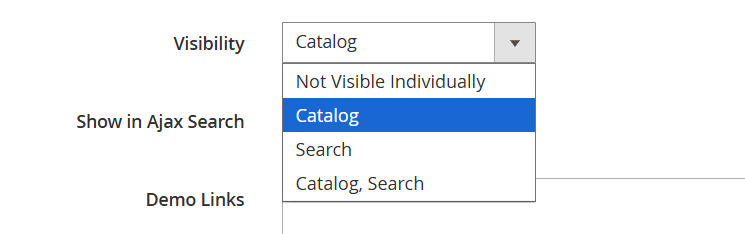
Catalog visibility means your product can be accessed via categories it is assigned to. So the next step is to exclude your test product from all the categories. This can be done on the Categories tab:
- Set meta robots for the test page
You don’t need your test page to be indexed by Google, so restrict access for spiders by adding meta robots to the <head>:
<meta name="robots" content="noindex, nofollow">
- Copy product reviews
Product reviews have a direct influence on sales, so there is no point in testing anything if your test page doesn’t show reviews that are seen on the original page. The exceptions are:
- Your aim is to see the influence on sales by removing reviews from the test page.
- The original product page doesn’t have any customer reviews.
- Duplicate all the possible settings
There is no universal solution for that, because each Magento shop has its own design and collection of extensions and customizations. You will need to check field after field, tab after tab to make sure you have two identical products. Except for the single element you're testing, of course.
NB: You may have some product options bound to SKUs or URLs, so don’t forget them, too. For example, if your images are automatically loaded from a folder named just like the product SKU, copy this folder and change its name in accordance with the SKU of your test product. This way, all the needed images will be loaded on the test page.
Magento A/B Testing Flow: Key Steps to Do
Magento A/B testing is a powerful way to optimize your store, but it works best when you follow a clear, straightforward approach. Each step builds on the last, helping you gather valuable insights and make data-driven decisions that are backed by real results, not assumptions.
Step 1: Identify Baseline Metrics
Before jumping into any changes, start by evaluating your Magento store's current performance. Look at key metrics like your conversion rate, bounce rate, cart abandonment rate, and average time spent on site. These baseline numbers will help you track progress and measure success in the future. Without them, you won’t know if your changes are making a real difference.
Step 2: Segment Your Customers
Your customers aren’t all the same, so why treat them as if they are? Different types of shoppers behave differently – new visitors, returning customers, mobile users, and desktop users each have distinct patterns. By segmenting your audience, you can create more targeted A/B tests that will cater to specific behavior patterns of a targeted group.
Step 3: Generate Hypotheses
Once you’ve gathered your research, it’s time to turn those insights into testable ideas. For example, let’s say you notice mobile users tend to abandon their checkout process. Your hypothesis might be, “Simplifying the mobile checkout process will reduce cart abandonment and increase conversions.” A clear hypothesis makes it easy to track and evaluate the success of your test.
Step 4: Set Up Test Variant
Now it’s time to create the variations you want to A/B test in your Magento store. You might tweak your call-to-action button, redesign your product page, or simplify the checkout process. The key here is to make sure the changes are significant enough to measure, but not so complex that they’re hard to analyze.
Step 5: Run the Test
Launch your Magento A/B test variants and let real customers interact with them. Be sure to run the test long enough to gather sufficient data. A small sample size won’t give you reliable results, so give your test the time it needs to provide actionable insights.
Step 6: Analyze Results
After the test is done, it’s time to analyze the results. Did one version outperform the other? Look at key metrics like conversion rates, bounce rates, and other secondary metrics to see the full impact. The goal is to improve the overall shopping experience, not just one isolated number.
Normally, any popular A/B testing tool does the calculation for you. If you want to double check the results, here is an A/B tests significance calculator that may be of help. You can also find other calculators or mathematical formulas to dig into details.
Step 7: Implement the Winning Version on Prod
Once you’ve identified the winning version, it’s time to roll it out across your Magento store. Or, if the original version proved to be better than the tested hypothesis, just keep it as it is. Don’t forget to hide the split version from your users, so as not to lose conversions or downgrade store performance.
Step 8: Rinse, Repeat
Magento A/B testing is a continuous process. Once you’ve made one improvement, move on to the next. With each test, you’ll uncover new opportunities for optimization. Over time, these small wins add up to big results – more sales, happier customers, and a stronger Magento store.
Important Things to Know About Magento A/B Testing
Avoid quick decisions
Say, the experiment has been running for 2 days and you already see that the original page converts better so you decide to stop the test. That’s the wrong decision.
The experiment period greatly depends on your traffic: the more visitors you have, the shorter your experiment can be. But try to wait at least 2 weeks before taking any decisions, you will see that the results may change from day to day and at the end they may be completely different from those you observed at the beginning.
Don’t make anything special with the tested pages
Say, you are A/B testing product images for you cupcakes page. The experiment is running and you decide to launch a promo campaign with 30% discount on the cupcakes. I’m sure you’ll increase sales but the experiment results will be inaccurate, as your promotion but not images, will be the driving force for sales increase.
Also, think of the time you will be conducting the test. Results you receive from seasonal Christmas traffic will be applicable for seasonal visitors, but not for regular traffic.
Lesson learned: don’t try to use anything special to enhance sales of the tested product.
Test different variations at once
You need to test three fonts: the original one and two others. So you decide to create one test page and test two fonts at first. Once the winner is found, you set up a new experiment to test the next font. Wrong! You won’t get accurate results as the conditions and the time of your experiment have changed. That means you’d better test one thing with as many variations as you need. This is also known as multivariate testing.
Summing up
I’ve tried to give you a full overview of A/B testing in Magento. But you should understand that there’s no single guideline that provides all the answers for super successful tests. You’ll see that some of them fail and some turn out to be great conversion boosters. Moreover, you will face new challenges each time you will set up tests, but you’ll definitely learn something new about Magento and your audience. That’s really interesting! If you've tried this guide and feel like you need more for your Magento store, feel free to have a look at Magento A/B Testing extension from Amasty.
In a nutshell, you should test, test and test different things in your Magento store. That will help you to stand head and shoulders above the competition.